

Performance Analysis
/Portfolio Performance Tool Guide
Portfolio Performance Tool Guide
Learn how your portfolio grew over time, how it behaved across market periods, and how to compare results with a benchmark using the Portfolio Performance tool.
Portfolio Performance helps you evaluate historical portfolio growth using daily closing prices adjusted for splits and dividends.
The tool is useful when you want quick, reliable answers to questions like:
- How strong was long-term growth?
- How consistent were returns across years and months?
- How did performance compare with a benchmark?
- How did allocations evolve over time?
Raw return alone can be misleading. This tool adds context with benchmark comparison, calendar return structure, and allocation dynamics.
How to Use the Tool
Use this workflow in Portfolio Performance:
1
Select Portfolio Positions
Choose or build the portfolio you want to evaluate in the portfolio selector.
2
Choose a Benchmark
Pick a relevant market reference so your results are interpreted in context.
3
Set Inflation Adjustment
Enable inflation adjustment if you want to view performance in real purchasing-power terms.
4
Run Calculation
Click "Calculate performance" to generate charts, returns tables, and allocation history.
5
Review Results by Section
Start with the growth chart, see which holdings drove it in the growth contribution chart, validate consistency in the returns table and heatmap, and finally inspect allocation changes over time.
Re-run the same setup after portfolio changes (new positions or rebalancing updates) to understand how each decision affected your performance path.
Tool Settings
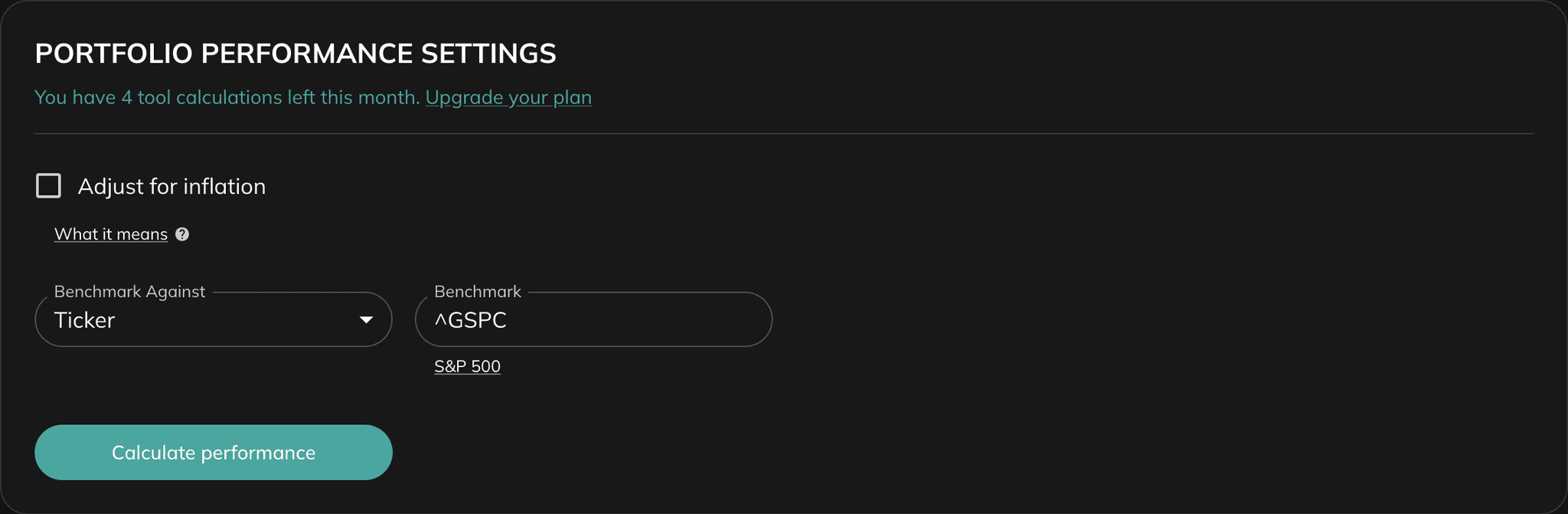
The Portfolio Performance tool has two primary settings:
- Adjust for Inflation — When enabled, historical growth is presented in real terms so you can evaluate purchasing-power growth instead of nominal growth.
- Benchmark — Sets the comparison baseline. This helps you judge whether portfolio performance was stronger or weaker than a relevant market reference.
Inflation Adjustment
When you adjust for inflation, your portfolio's performance is evaluated in real terms, rather than nominal terms.
- Nominal performance reflects the raw returns without accounting for the impact of rising prices over time.
- Real performance adjusts these returns to remove the effects of inflation, giving you a clearer picture of your portfolio's actual purchasing power.
This adjustment helps you understand whether your investments are truly growing in value or merely keeping pace with inflation.
Example:
If your portfolio grows by 5% in a year, but inflation is 3%, the real growth is only 2%. Similarly, if your portfolio loses 2% in a year, but inflation is 3%, the real drawdown is 5%.
By enabling this option, you ensure your portfolio's performance is measured more accurately, helping you make better investment decisions.
If required inputs are missing (for example, invalid positions or no benchmark), the tool displays validation errors before calculation.
Results: Section-by-Section Guide
1. Portfolio Performance Chart
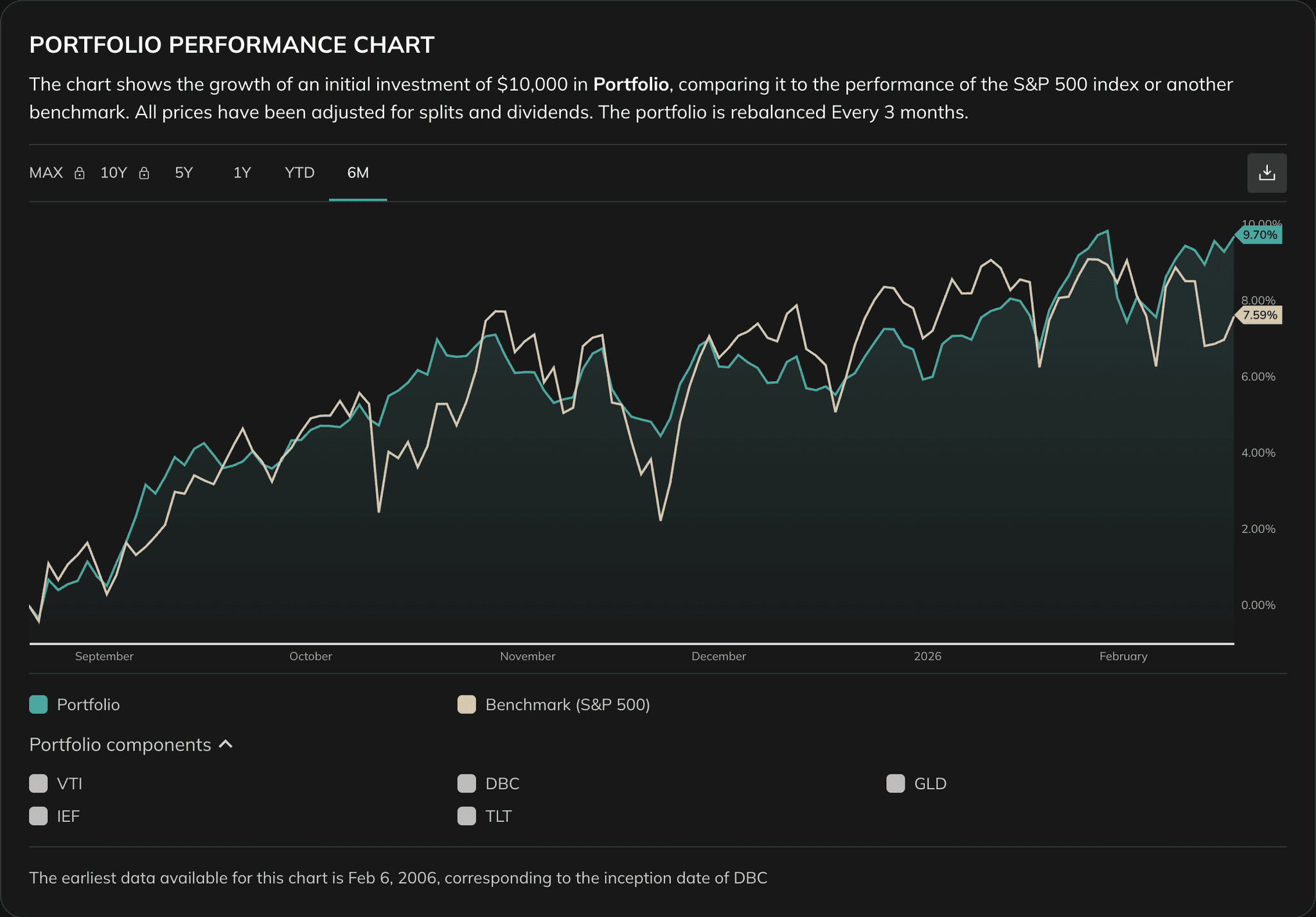
This chart shows cumulative portfolio growth through time and is the main overview of path quality.
Use it to identify:
- Long-term growth trend
- Major stress and recovery periods
- Relative behavior versus the benchmark
- Whether growth was smooth or highly path-dependent
2. Portfolio Growth Contribution
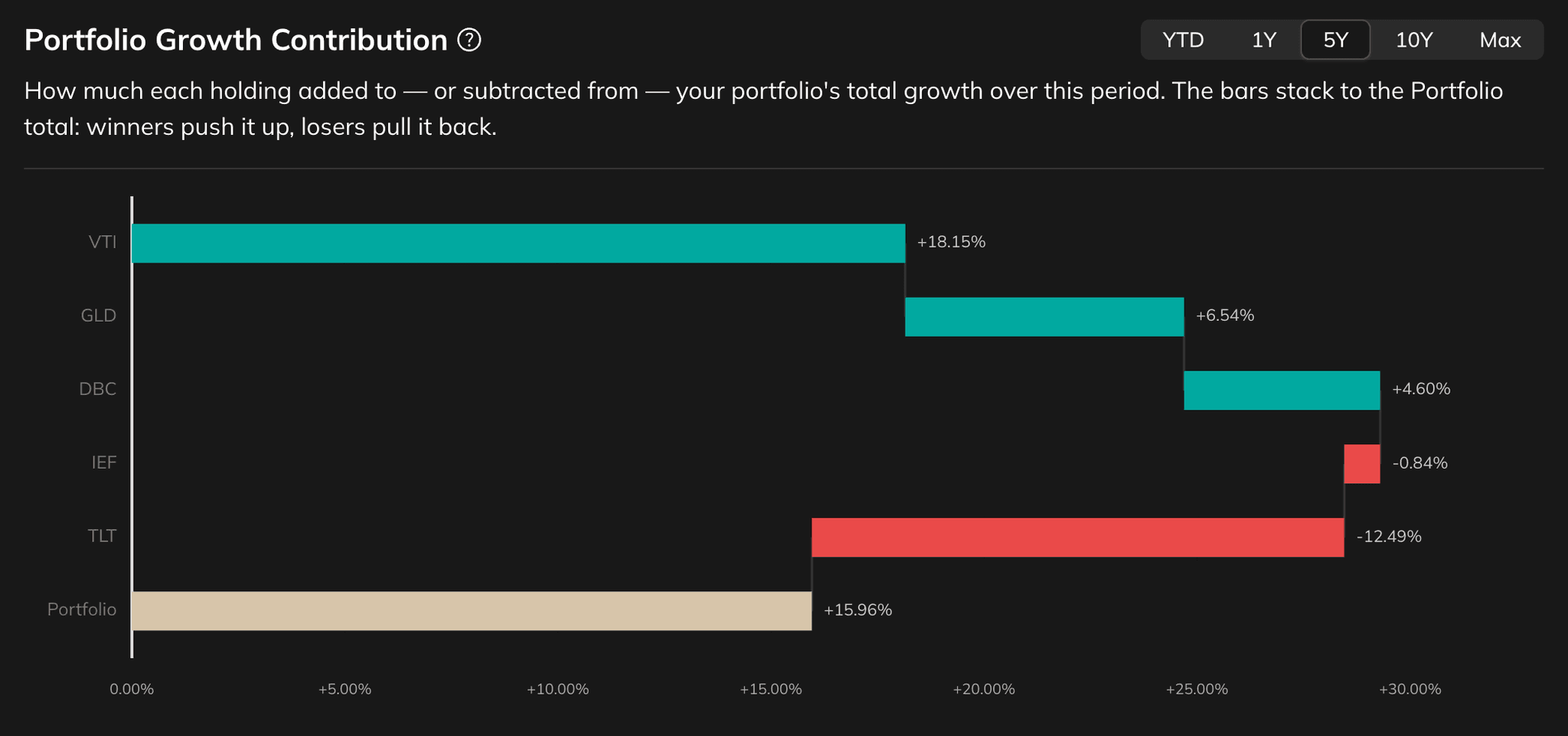
This waterfall chart breaks total portfolio growth into how much each holding added or subtracted. Bars stack from the strongest positive contributors down to the detractors and add up to the overall Portfolio total, so you can see which holdings actually drove the result — not just how each one performed on its own. A holding's contribution reflects both its return and how much of the portfolio it represented, day by day, as allocations drifted and rebalanced, so it will not match that holding's standalone return.
Use it to identify:
- Which positions contributed most to (or detracted most from) total growth
- Whether growth was broad-based or concentrated in a few holdings
- How a holding's size and timing, not only its return, shaped its impact
Switch the period selector (YTD, 1Y, 5Y, 10Y, Max) to compare recent drivers with long-term ones — the 5-year, 10-year, and full-history views are available on Plus. Hover any bar to see its average allocation over the selected period. Holdings beyond the top ten are grouped into a single "Other positions" bar.
3. Returns Table
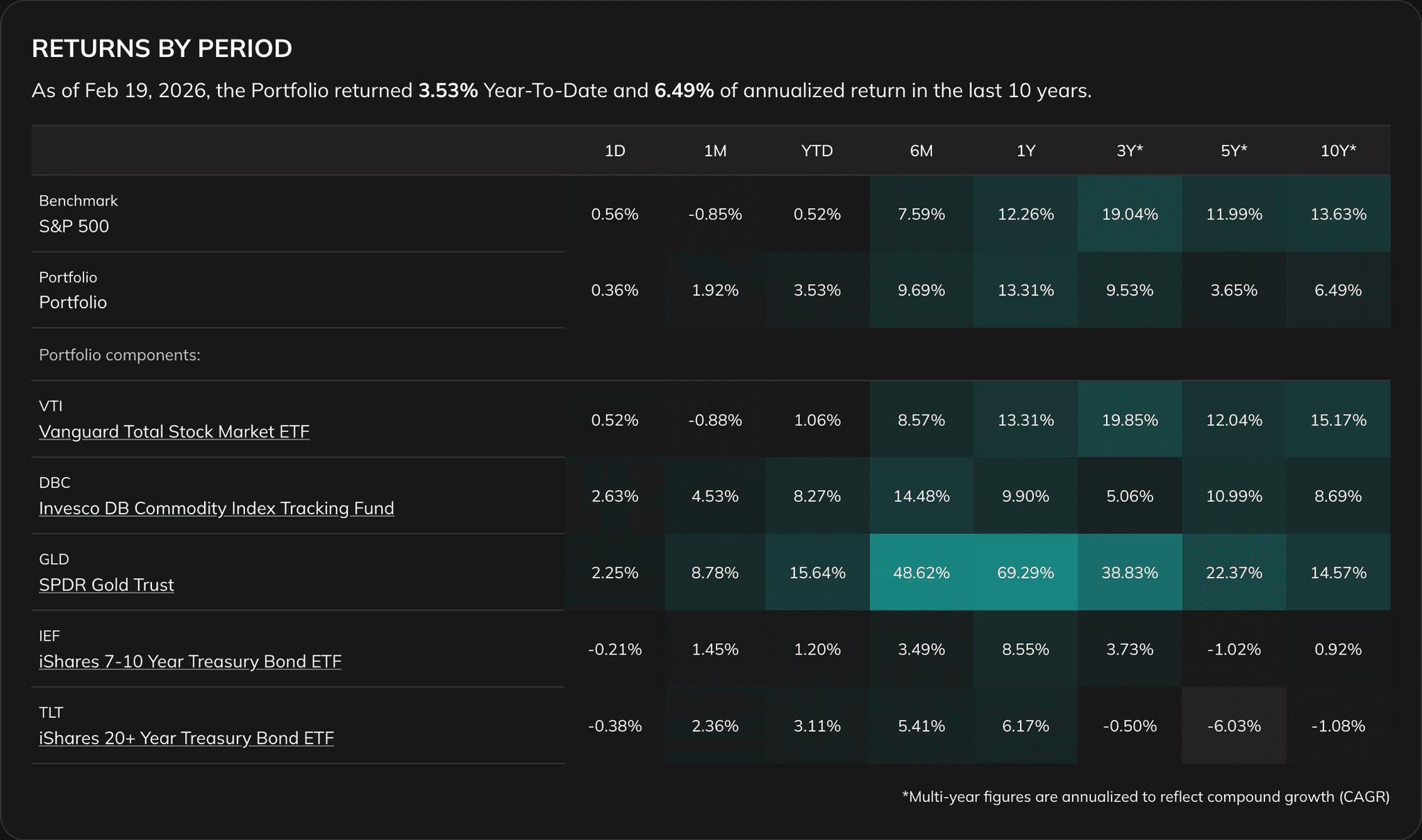
The returns table helps you evaluate return quality across multiple windows, such as shorter periods and long-horizon annualized views.
Use it to check:
- Period-by-period consistency
- Relative strength versus benchmark
- Whether returns are concentrated in a narrow regime
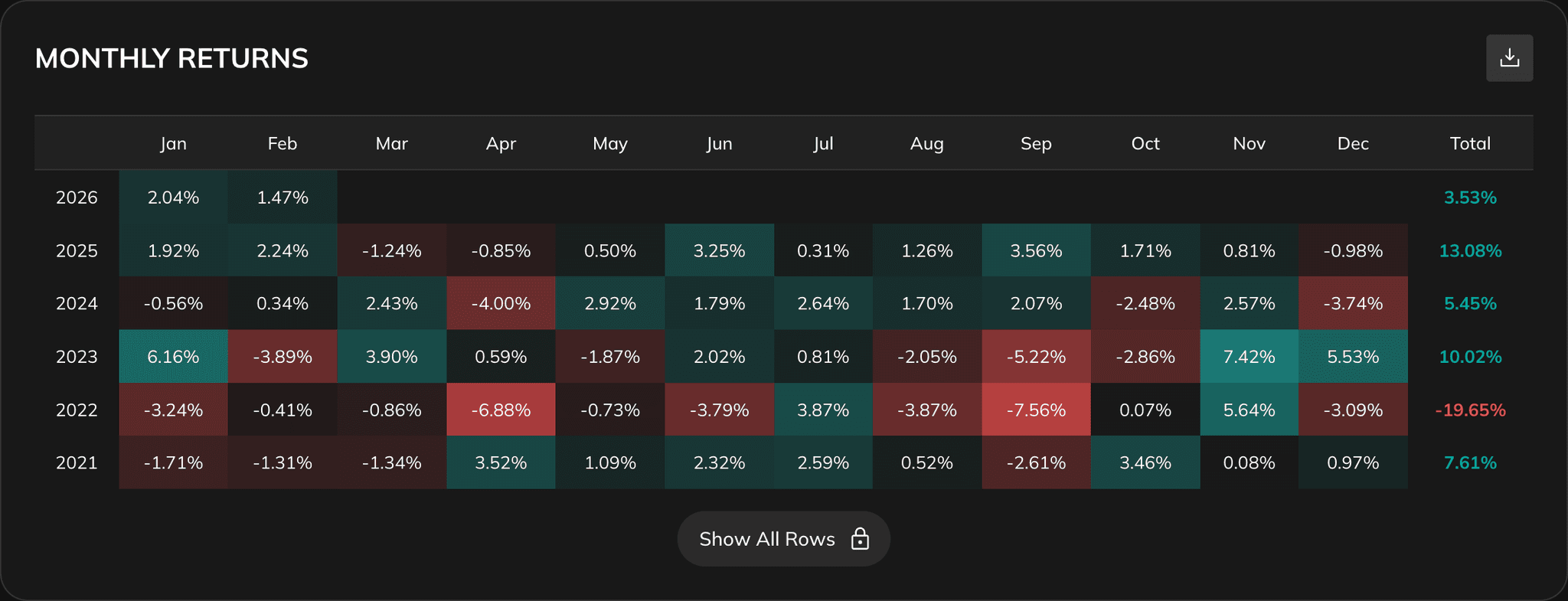
4. Returns Heatmap
The heatmap gives a quick visual view of return distribution by month and year. It helps you spot:
- Good and weak market regimes
- Return clustering by period
- Stability versus volatility of outcomes
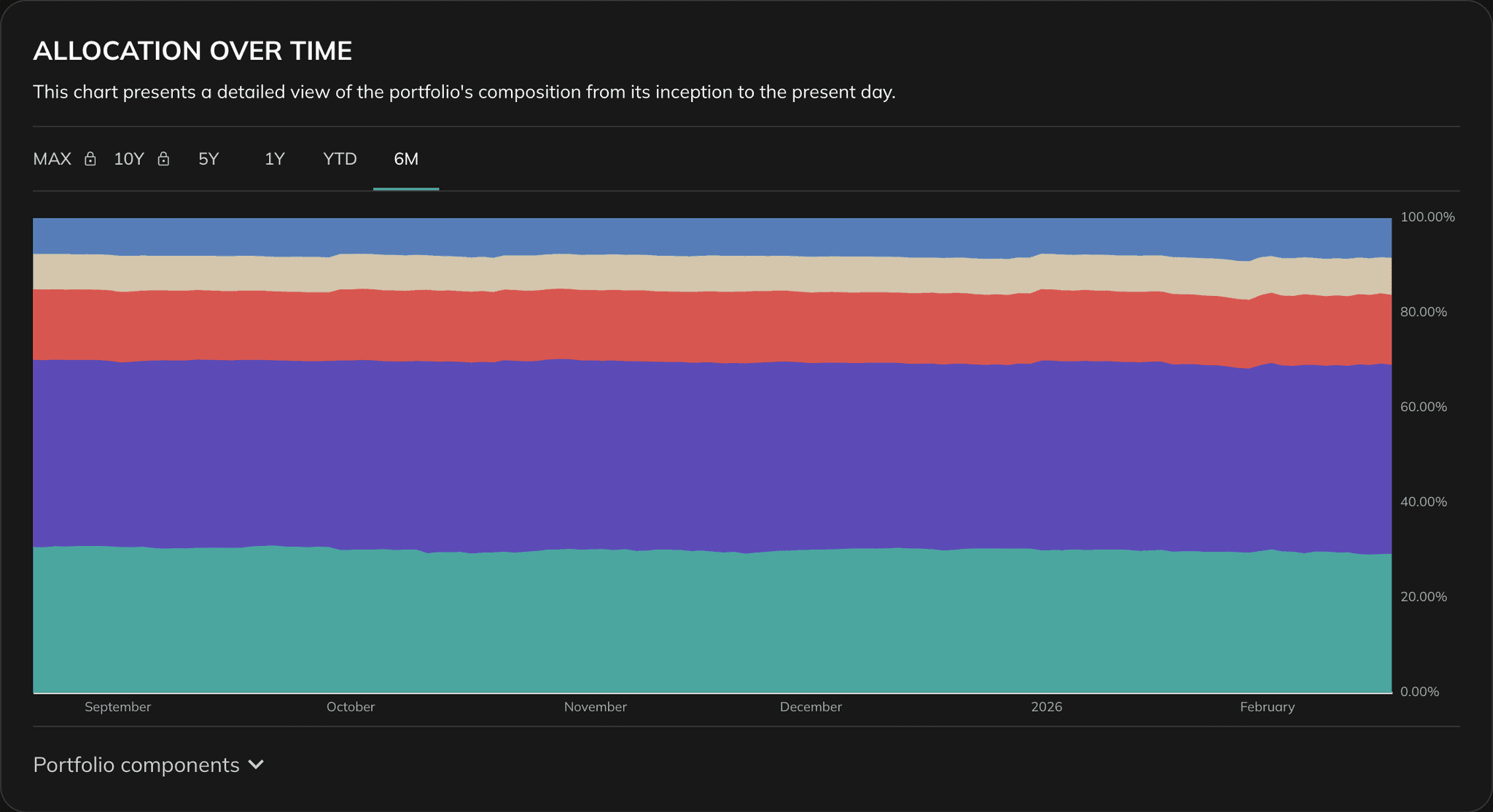
5. Allocation Over Time
This chart shows how portfolio weights evolved through time. It helps you understand concentration changes and how rebalancing settings influenced exposure.
Review this section for:
- Drift in position weights
- Concentration increase or decrease over time
- Whether allocation behavior matches your strategy design
Use all sections together: growth path, period return consistency, and allocation dynamics. This gives a stronger decision basis than one headline return number.
Example
Suppose two portfolios both start at $10,000 and end with similar total return after 5 years.
Portfolio A shows smoother growth, fewer negative months in the heatmap, and more stable allocation through time. Portfolio B shows sharper swings, clustered weak periods, and larger allocation drift between rebalances.
Even if the final value looks similar, Portfolio A may be easier to hold and more predictable in real-life decision making. This is the practical value of Portfolio Performance: it reveals the path quality of returns, not only the endpoint.
Best Practices
Use a relevant benchmark
Comparison quality depends on benchmark relevance to your portfolio strategy.
Check both nominal and real results
Inflation-adjusted analysis is especially important for long horizons.
Review consistency, not only final return
Heatmap and period returns help you avoid overvaluing one strong period.
Re-run after each meaningful portfolio change
Track how changes in weights or holdings alter performance path and stability.