

Introducing Portfolios as Benchmark
One of the most common requests we’ve received over the past few months was the ability to benchmark a portfolio against another portfolio — not just against an index or ETF.
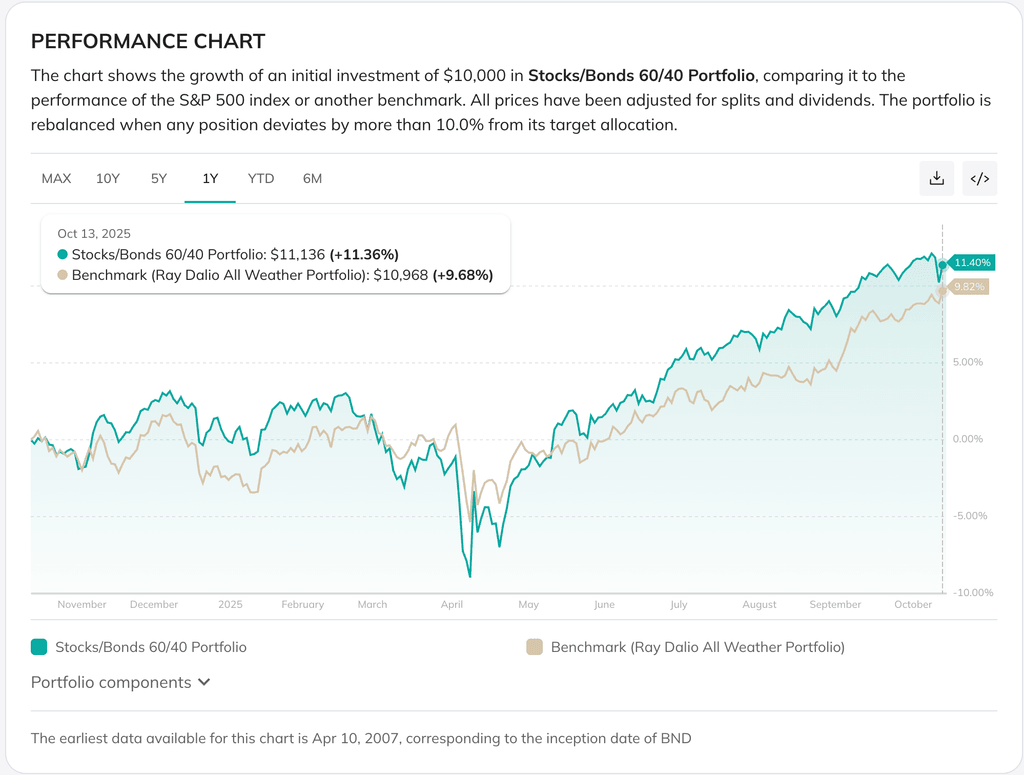
Today, we’re excited to introduce Portfolios as Benchmark, a new feature that makes this possible. You can now directly compare two portfolios side-by-side, test different strategies, and visualize which allocation performs better over time.
Why We Built It
Until now, benchmarking on PortfoliosLab was limited to indices or single assets. That worked well for high-level context — comparing your portfolio to the S&P 500, for instance — but it didn’t fully capture the way investors actually think about strategies.
Many of our users manage or track multiple portfolios: long-term vs. tactical, traditional vs. factor-based, passive vs. active, or even personal experiments in asset allocation. Being able to evaluate these portfolios against each other provides a much deeper understanding of how each strategy behaves under the same conditions.
We built this feature because investment analysis isn’t just about beating the market — it’s about learning what works better for a given objective.
What You Can Do With Portfolios as Benchmark
With this update, you can now:
- Compare two custom portfolios directly. Select any existing lazy portfolio or your custom portfolio as the benchmark and visualize relative performance over time.
- Test competing strategies. For example, see how a traditional 60/40 stock–bond mix stacks up against an all-weather portfolio.
- Evaluate portfolio improvements. Clone and tweak your existing portfolio (e.g., change weights or add an asset) to see how the modification impacts performance when benchmarked against the original.
- Understand relative risk and return. Analyze drawdowns, volatility, and returns not just in isolation but relative to the strategy you care about most.
Why It Matters
This new capability turns portfolio analysis into an interactive experiment. You can now explore questions like:
- Which allocation performs best across different market regimes?
- How much diversification benefit does a complex strategy really provide?
- Does quarterly rebalancing outperform buy-and-hold for my mix?
By putting portfolios side-by-side, the answers become clearer — supported by data, not intuition.
Getting Started
You’ll find the new benchmark selector right under the Portfolio Allocation section. Simply open any portfolio, select benchmark agains portfolio, and choose another portfolio from your account.

The comparison updates instantly, showing cumulative returns, risk metrics, and drawdown charts in a familiar, intuitive interface.
We’re continuing to expand the ways you can analyze and compare investment strategies on PortfoliosLab. If you have ideas or feedback about how you’d like to use Portfolios as Benchmark, we’d love to hear from you — your input directly shapes what we build next.
0 комментариев
Сортировать по