

Find Better ETFs and Mutual Funds Without the Guesswork
We just made it easier to find better ETFs and mutual funds in the same category. Instead of opening a dozen tabs and running screeners, you can now see all the relevant alternatives ranked by the things that actually matter — like expense ratio, risk-adjusted returns, and drawdown — right on the fund's page.
What we added
Every ETF and mutual fund on PortfoliosLab now has an Alternatives page. Open any fund — say, VOO — and you'll see a breakdown of similar funds from the same category, ranked by the things that actually matter when choosing between them.
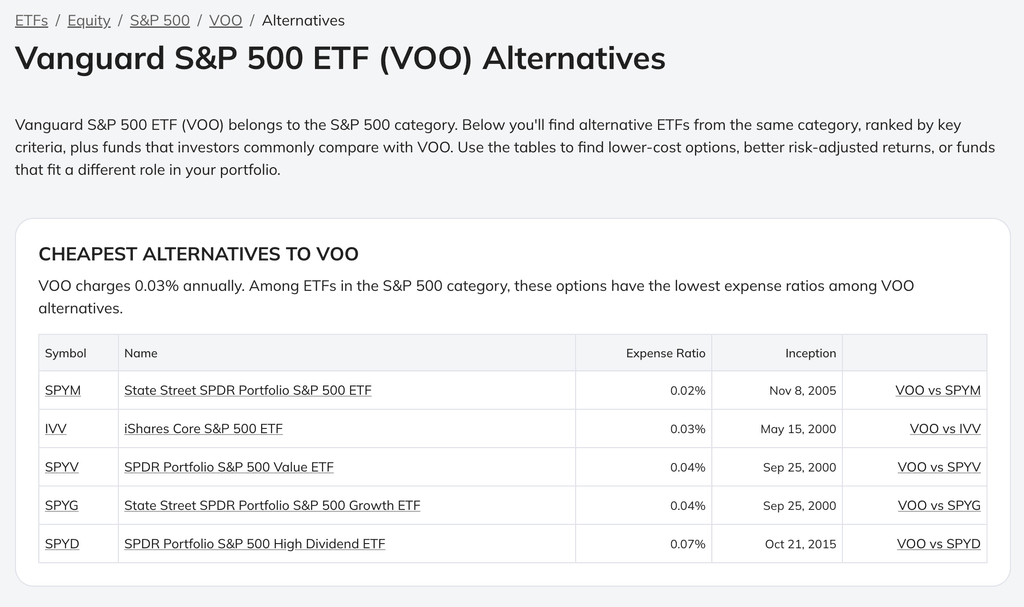
The page is split into five sections, each answering a different question:
Cheapest alternatives — same category, sorted by expense ratio. If you're paying 0.50% and there's a nearly identical fund at 0.03%, you should know about it.
Best risk-adjusted alternatives — ranked by PortfoliosLab's combined score that accounts for volatility, drawdown, and return consistency over one year. Not just "what went up the most" but "what went up without falling off a cliff."
Top performing (YTD) — straightforward year-to-date returns. Useful for spotting momentum, less useful on its own.
Lowest volatility and lowest drawdown — for when your goal is sleeping through a correction, not chasing returns.
Below the ranked tables, you'll also see funds from the same issuer and a list of what other investors commonly compare with the fund you're looking at — based on real usage data, not editorial picks.
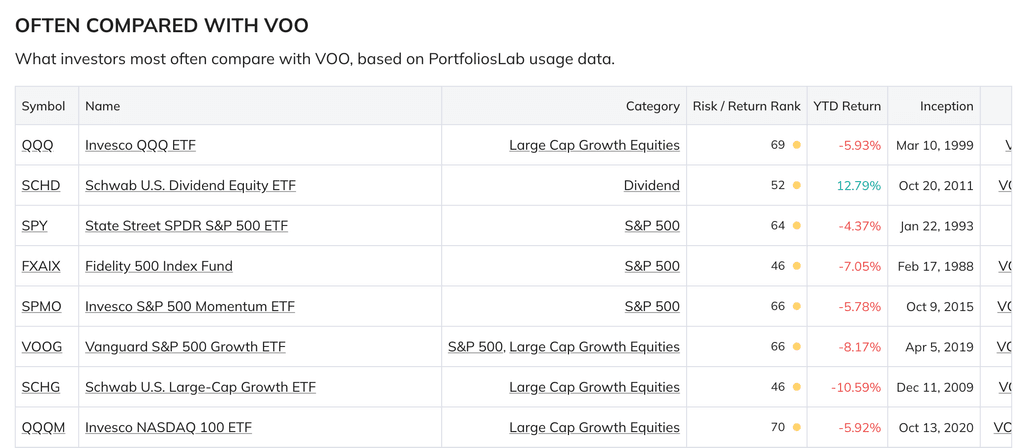
The alternatives page starts from the fund you're already researching and surfaces what you'd find if you spent an hour digging through screeners — ranked, filtered to the same category, and ready to compare side by side. Each row links directly to a full head-to-head comparison if you want to go deeper.
A few ways to use it
You hold a broad-market ETF and want to check whether a cheaper option exists in the same category. Open its alternatives page and look at the expense ratio table.
You're evaluating a fund someone recommended and want to see how it stacks up on risk. Check the risk-adjusted and drawdown tables to see where it falls relative to peers.
You want to understand what else is out there before committing to a position. Scan the full page, then compare directly with anything that catches your eye.
0 комментариев
Сортировать по