

Making constant changes to weights breaks performance numbers
BZ
Bee Zee12 июля 24 г. | Опубликовано в Общая
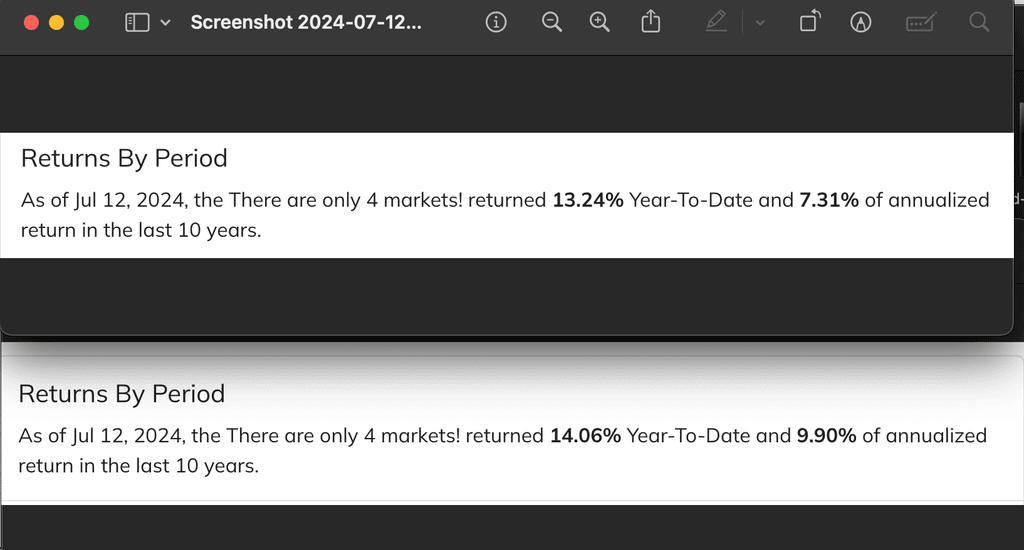
Sometimes if making a bunch of changes to the weights editing and saving editing and saving eventually the performance numbers just break, even when going back to the original weights it doesn't show the same performance numbers.
2 комментария
Сортировать по
Самые старые
DS
Dmitry Shevchenko12 июля 24 г.
Hmm, I tried a couple of portfolios quickly and didn't spot any issues. Can you share more details on the reproduction steps so we can investigate further?
BZ
Bee Zee12 июля 24 г.
Try for example there are only 4 markets portfolio:
1. Note the performance numbers for the default allocation 33, 17, 17, 33 2. Change the allocation to 25, 25, 25, 25, Click Save, View Numbers might stay the same 3. Change the allocation to 50 0 0 50 Click Save View 4. Change the allocation to the original 33 17 17 33 Click Save View
The performance umbers most likely won't be the same as the first time
Just go to any portfolio remember a baseline allocation, change the numbers and save view a few times, then go back to the original allocation numbers you should see the performance numbers are different:
System: OSX Sonoma 14.4 M1 Chrome
Feel free to reach out if you want to screen share if you can't reproduce
Категория
Общая
Просмотры
672