

Where upload data?
Hi
have a pro subscription. I assumed that the function "upload your own data" = upload own data for a asset etc. that not was listed here, but where do I do that? Can't really find that in an easy way. Or have I misunderstood the "upload your own data" ?
4 комментария
6 ответов
Сортировать по
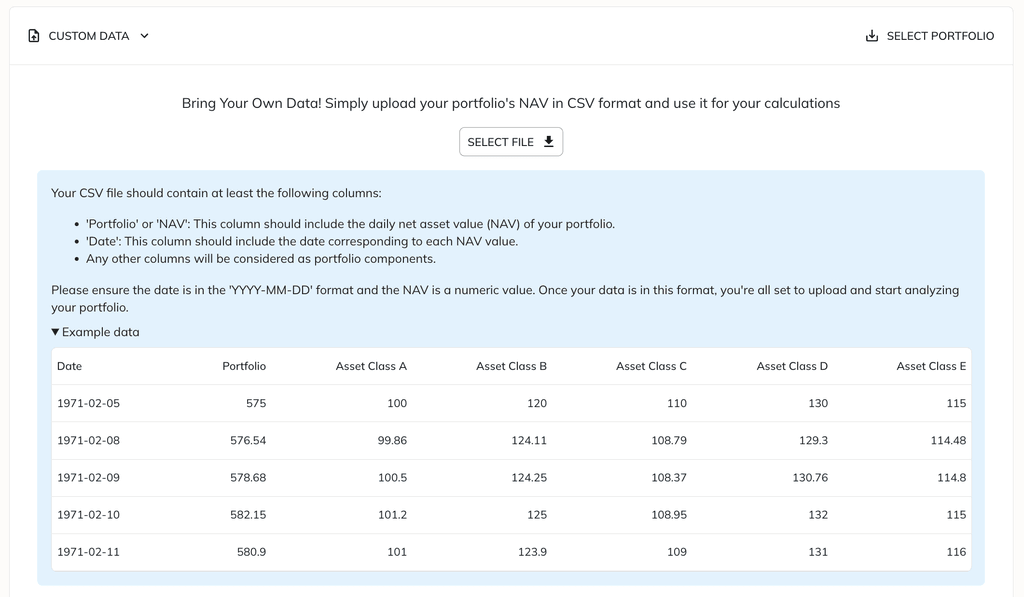
Hi! You can create a portfolio with your own data by selecting "Custom Data" in the portfolio type selector. This allows you to upload your portfolio NAV along with the components as a CSV file. You can upload daily or monthly NAV values. Once uploaded, you can use this portfolio with any tools available on the website. Let me know if you have more questions about this process.
-2 г.
Yes, I did discover that function. But what I would like to do is to create my own Asset to be used in combination with the other assets that already is in the database. For example, I have the history of an EU fund that doesn't exist in the database, it would be a lot better if I could create this asset and simply add it when I develop my portfolio.
If I now have an (by the database) unknown asset, I need first to find and export the data for the 'known' assets I want to use, and then create my own portfolio in excel , add my 'unknown asset', create the NAV and then upload it again to portfolioslab. It would be a lot easier to create my own 'asset'.
-2 г.
The main problem is that the EU / Local ETF and fund "universe" don't match the US, so it is a nightmare to find funds / EFTs that are available in EU and / or your local country/broker. I spend more time trying to find a EU / local asset that corresponds to some suggestion than to fine-tune or evaluate portfolios. So it is, sorry to say, difficult to ask for " all funds / EFT available on broker xxx".
But I think I have a workaround, to basically ;
1. create a huge synthetic portfolio with the help of chatGPT and CSV data from my own assets,
2. import it, make a portfolio a
3. Remove the assets I don't want to have for the specific optimization
4. Add the ones you have in your database.
Not a big thing now when I have my own script in place to create the CSV files, but a function to upload my own asset data would really be a nice thing to have.
-2 г.
Yeah, I'm well aware of that problem, as I'm based in Europe myself. Haven't found a good solution yet. One option is creating watchlists with symbols available at European brokers and then using them as input for screeners and other tools. However, broker universes change quite a bit, and keeping everything up-to-date could be too tedious.
Your suggestion also seems sensible and could be applied in other contexts, like exporting strategy results and backtesting them alongside other instruments in a portfolio. I’ll need to think more about how we can support this.
Sorry to say, but I can't get the optimization to work with the file I upload now when I have some time to play around. I load custom data with the following last rows;
Date,Asset1,Asset2,Portfolio
2024-04-08,2210.95,1340.71,3551.66
2024-04-09,2209.16,1340.08,3549.24
2024-04-10,2227.35,1340.02,3567.37
2024-04-11,2231.9,1339.85,3571.75
But no matter how I optimize the portfolio, the result will still be the average between asset1 and asset 2. The 'optimized' and 'original' portfolio is always the same. Even if I force a change to min pos to 50% for one of the assets it will create the same output as if when one of the assets are 10%. So it seems like the Weight between asset 1 and 2 not are changed.
-2 г.
-2 г.
Hi! Just starting the process, and want to upload some data. I made a csv format as clean as possible, with that structure:
date; price ;quantity;symbol;type
11-12-23;4.44;2114;ELA;buy
11-12-23;262.22;28;SMCI;buy
11-12-23;957.01;27;AVGO;buy
I Tried to upload it as transactional portfolio and got that message: "Required columns not found: price".
Please help me with some info on how do I do format the data.
Thanks in advance!
в пр. г.