

Optimization
/Mean-Variance Optimization
Mean-Variance Optimization
Find the best allocation of assets in your portfolio using advanced mathematical models that balance expected return against risk.
Portfolio optimization is a quantitative process used to select the best possible combination of assets and their weights given a set of objectives and constraints. The primary goal is to maximize return while minimizing risk.
Mean-Variance Optimization (MVO) is the classical approach, originating from Harry Markowitz's Modern Portfolio Theory. It finds the portfolio allocation that maximizes returns for a given level of risk — or minimizes risk for a given level of expected return — based on historical data.
Optimization Settings
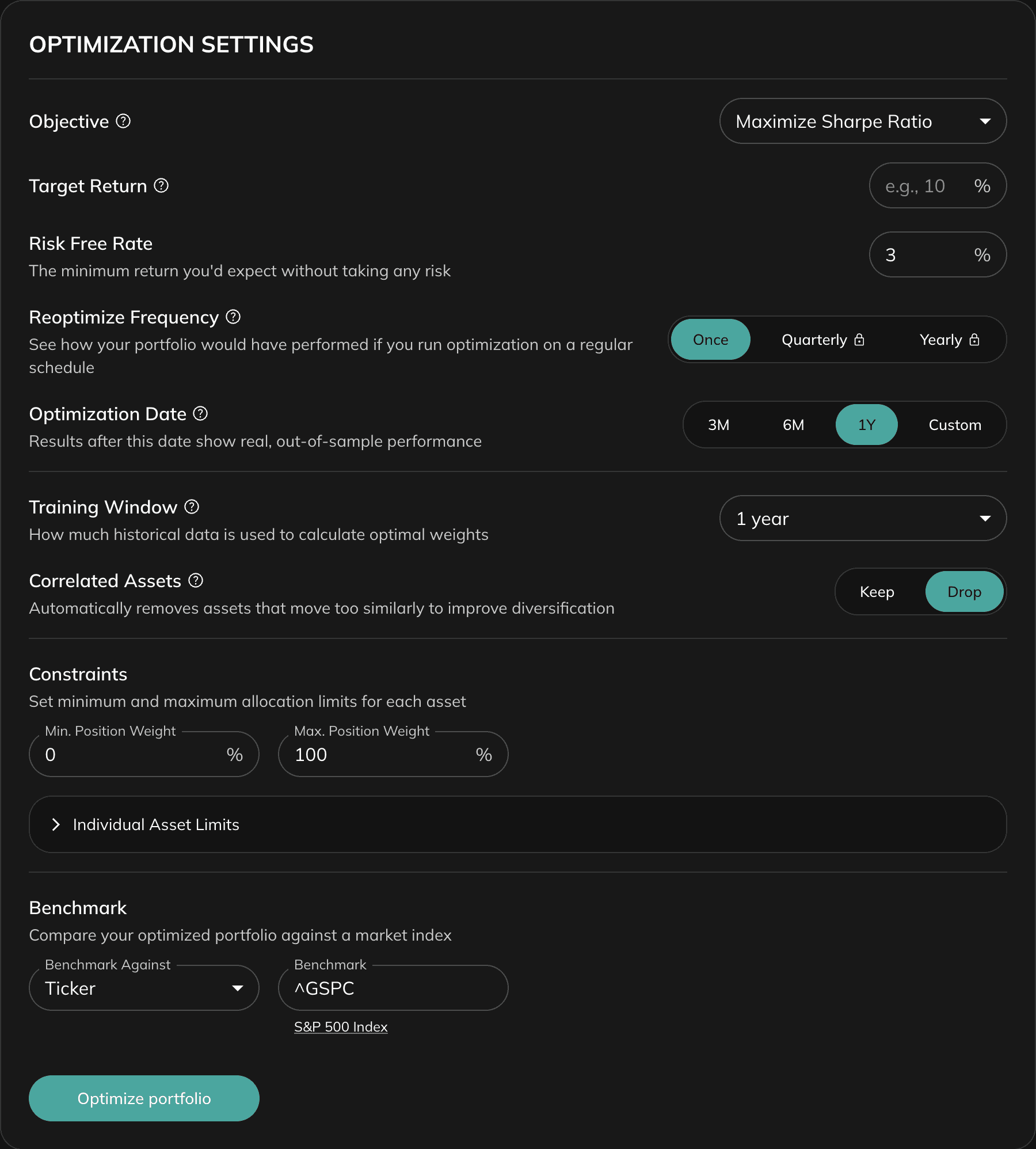
All settings are in the Optimization Settings panel. Configure them before clicking Optimize Portfolio.
Objective
The objective defines what the optimizer is trying to achieve. Choose one based on your investment goals and risk tolerance.
Minimize Volatility
Reduces the overall fluctuations in portfolio value. Creates the most stable, predictable portfolio. Best for risk-averse investors who prioritize capital preservation.
Maximize Return
Seeks the highest possible expected return without considering risk. Does not account for volatility or downside risk. Suitable for aggressive investors with high risk tolerance.
Maximize Quadratic Utility
Balances risk and return by maximizing the difference between expected return and a penalty for risk. Higher penalties are applied for higher risk, encouraging a balance between return-seeking and risk control.
Maximize Sharpe Ratio
Finds the portfolio with the highest risk-adjusted return — the tangency portfolio. The Sharpe ratio measures excess return per unit of total risk. Good general-purpose objective for most investors.
Maximize Sortino Ratio
Similar to Sharpe but only penalizes downside risk (negative fluctuations). Useful when you care more about avoiding losses than reducing overall volatility.
Maximize Omega Ratio
Evaluates the full distribution of returns. Compares the likelihood of achieving target returns to the likelihood of falling below them. Provides a more complete picture of risk-reward when return distributions are non-normal.
Minimize CVaR
Minimizes Conditional Value at Risk (expected shortfall) — the average loss in the worst-case scenarios beyond a given probability threshold. Focuses on reducing the impact of extreme losses.
Minimize Drawdowns
Minimizes the maximum peak-to-trough decline in portfolio value. Particularly valuable for investors focused on wealth preservation and avoiding large losses. Also used in the Calmar Ratio (Return / Max Drawdown).
Choosing the Right Objective
If you are unsure, start with Maximize Sharpe Ratio. It balances risk and return without requiring extra parameters. If you want to protect against severe losses, try Minimize CVaR or Minimize Drawdowns.
Target Return
An optional minimum annual return the portfolio must achieve. The optimizer will find the lowest-risk portfolio that still hits this target.
For example, set 10% to find the least risky allocation that delivers at least 10% annual return. Leave blank to let the optimizer work freely without a return constraint.
Not available when the objective is Maximize Return.
Risk Free Rate
The minimum return expected without taking any risk — typically approximated by short-term government bond yields. Used in the calculation of Sharpe, Sortino, and similar ratios. The default is pre-filled with a commonly used reference rate.
Reoptimize Frequency
Controls how the optimizer uses historical data over time:
Once
Optimizes using all available data up to the Optimization Date (or all data if no date is set). The weights are fixed after this single optimization.
Quarterly (Pro)
Re-optimizes at the end of each quarter using only data available up to that point, then tests performance on the next quarter. Simulates how the strategy would have performed if applied in real-time.
Yearly (Pro)
Same as Quarterly but re-optimizes once per year. More stable than Quarterly — useful for long-term strategies with lower turnover.
Optimization Date
Splits history into a training period (before the date) and an out-of-sample test period (after the date). The optimizer is trained on data before this date, and the results after it show real, unseen performance.
Use this to backtest a strategy historically. For example, set to January 2020 to see how a portfolio optimized before the COVID crash would have performed during and after it.
Preset options: 1Y, 2Y, 3Y, 5Y ago, or a custom date.
Training Window
How much historical data is used to calculate optimal weights.
1 Year
Emphasizes recent market behavior. More reactive to recent trends but statistically less stable.
3 Years (recommended)
Balanced approach suitable for most investors. Captures enough history while remaining sensitive to recent conditions.
5+ Years
Focuses on long-term structural patterns. More stable estimates but may miss recent shifts in asset behavior.
Correlated Assets
When set to Drop, the optimizer automatically removes assets with correlation above 0.95. From each highly correlated pair, it keeps the asset with the lowest average correlation to the rest of the portfolio.
This prevents optimization from being distorted by redundant assets that behave almost identically.
Constraints
Min. Position Weight
The global minimum allocation any single asset can receive. Default is 0% (assets can be excluded). Set to e.g. 5% to ensure every asset gets at least a 5% allocation.
Max. Position Weight
The global maximum allocation any single asset can receive. Default is 100%. Set to e.g. 20% to prevent concentration in any single position.
Individual Asset Limits
Per-symbol min/max constraints that override the global limits for specific assets. Expand this section to set custom boundaries for each ticker.
Freeze
Lock the current allocation of a specific asset. The optimizer will not change its weight. Useful for holding a fixed position (e.g., a core holding) while optimizing the rest.
Benchmark
An optional reference index (e.g., SPY) added to the performance charts as a comparison baseline. Useful for evaluating whether the optimized portfolio outperforms the broad market.
Results
After clicking Optimize Portfolio, results appear in several sections below the settings panel.
Optimal Asset Allocation
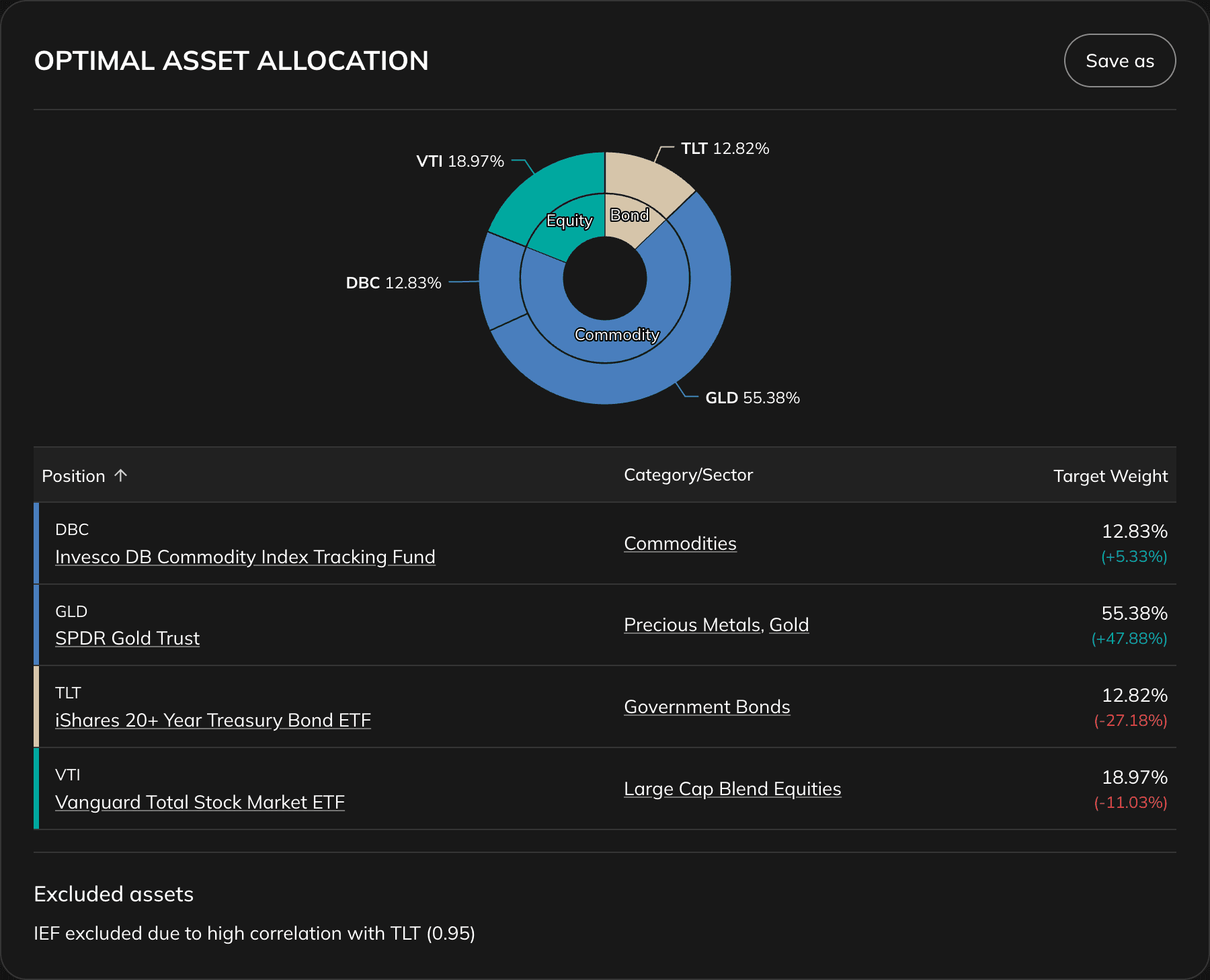
Shows the recommended weight for each asset in the optimized portfolio, compared against the original allocation. Assets with 0% weight have been excluded by the optimizer.
A Save as Portfolio button lets you save the optimized allocation as a new portfolio for further analysis.
If Drop Correlated Assets was enabled, excluded assets are listed below the chart along with the reason (which asset they were correlated with and the correlation value). If clustering methods were used, asset clusters are shown as well.
Key Improvements
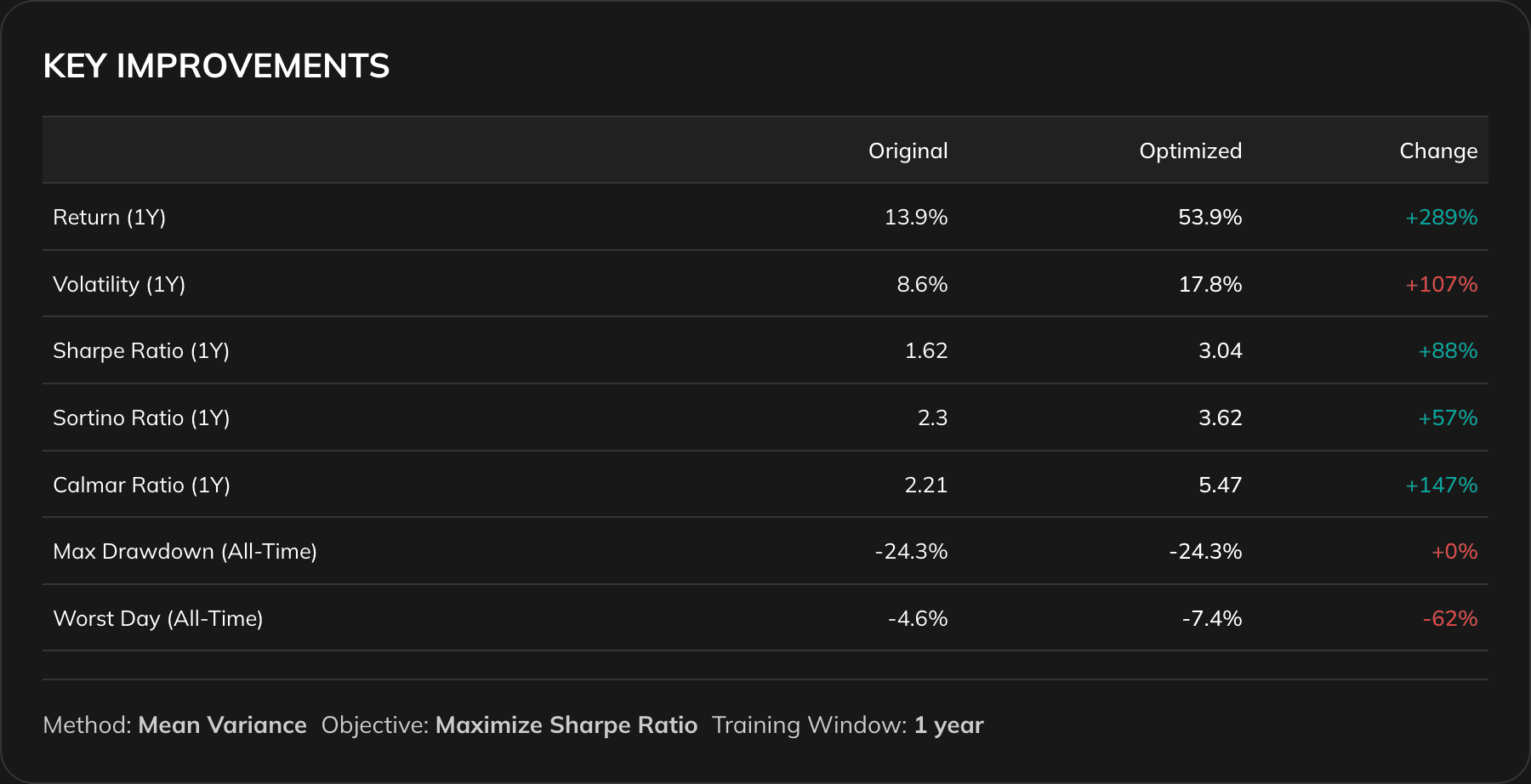
A side-by-side comparison of the original and optimized portfolio across key risk and return metrics:
Return (1Y)
Annualized return over the past year.
Volatility (1Y)
Annualized standard deviation of returns. Lower is more stable.
Sharpe Ratio (1Y)
Risk-adjusted return relative to volatility. Higher is better.
Sortino Ratio (1Y)
Risk-adjusted return relative to downside risk only. Higher is better.
Calmar Ratio (1Y)
Return relative to maximum drawdown. Higher is better.
Max Drawdown (All-Time)
Largest peak-to-trough decline in portfolio history. Closer to 0% is better.
Worst Day (All-Time)
The single worst daily loss in portfolio history. Closer to 0% is better.
Improvements are highlighted in green; regressions in red.
Performance, Drawdowns, Volatility, and Correlation Charts
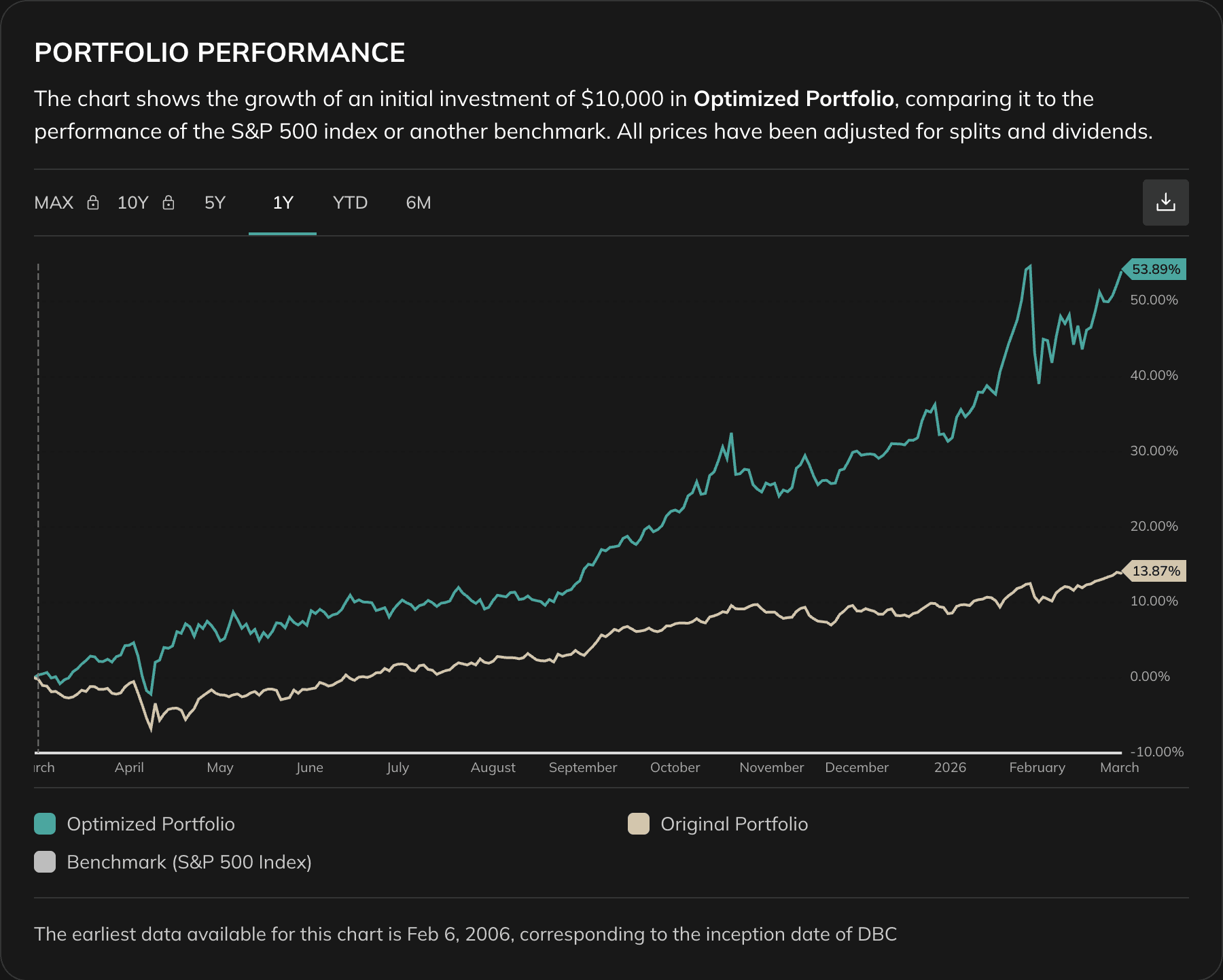
The results section includes full charts for:
- Portfolio Performance — cumulative return over time
- Allocation Over Time — how the weight of each asset changes over time
- Portfolio Sharpe Ratio — rolling Sharpe ratio
- Portfolio Drawdowns — drawdown periods and depth
- Portfolio Volatility — rolling volatility
- Correlation Matrix — pairwise correlations of the optimized portfolio assets
When an Optimization Date is set, a vertical line marks the boundary between the training period and the out-of-sample test period.
How to Choose the Right Objective
Consider your risk tolerance
If you are risk-averse, objectives like Minimize Volatility or Minimize CVaR are more suitable. If you are willing to accept higher risk for higher returns, Maximize Sharpe or Maximize Quadratic Utility are good choices.
Consider your investment goals
Saving for long-term goals like retirement? Maximize Sharpe Ratio tends to work well. More concerned with preserving capital? Minimize Volatility or Minimize Drawdowns.
Consider your investment horizon
Longer horizons allow more risk-taking. Shorter horizons may require a more conservative approach.
Ensure diversification
Include assets from different classes, sectors, and regions. Well-diversified inputs lead to more robust optimization results.
Suggested Next Steps
Run the optimizer with multiple objectives
Try Maximize Sharpe Ratio and Minimize Volatility on the same portfolio and compare the resulting allocations. This shows the trade-off between return-seeking and stability.
Use the Optimization Date to backtest
Set a date 2–3 years in the past and see how the optimizer's recommended weights would have actually performed out-of-sample.
Combine with Asset Correlations
Run the Asset Correlations tool first to understand the relationships between your assets before optimizing.
Compare optimization methods
Try the same portfolio with Risk Parity, HRP, or HERC to see how model-free approaches differ from MVO.
On this page
- Optimization Settings
- Objective
- Target Return
- Risk Free Rate
- Reoptimize Frequency
- Optimization Date
- Training Window
- Correlated Assets
- Constraints
- Benchmark
- Results
- Optimal Asset Allocation
- Key Improvements
- Performance, Drawdowns, Volatility, and Correlation Charts
- How to Choose the Right Objective
- Suggested Next Steps