

Basic stuff -- how do I upload a csv file?
I have tried to upload a csv file only to be told that it must contain a column titled symbol, name or something else which I cannot recall. My file has, in the first column, the Symbols in my portfolio. Followed by number of shares and then price paid.
I cannot get it to upload. What to do?
TIA
1 comment
1 reply
Sort by
To successfully upload your CSV, please make sure the first column has a header exactly named Symbol. The file should look something like this (the weight columns is optional):
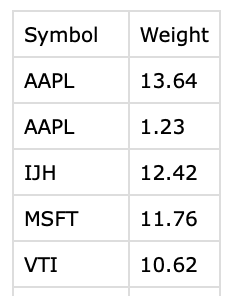
If your file uses a different header or no header at all, the system won’t recognize it and will reject the upload.
Alternatively, if you want the platform to track buys and sells over time, you can select the Transactional portfolio type. Then the upload should look like this (the full name column is optional):

last yr.