

Weight Constraints in Portfolio Optimizers
DS
Dmitry ShevchenkoAugust 11, 24 | Posted in Announcements
Hey all,
We’re thrilled to announce a new feature in our portfolio optimizer: the ability to specify position-level constraints! Whether a single position is taking up too much or too little of your portfolio allocation, you can now easily adjust it with our intuitive interface. This was one of the most requested features, and we’re excited to make it available to all users starting today.
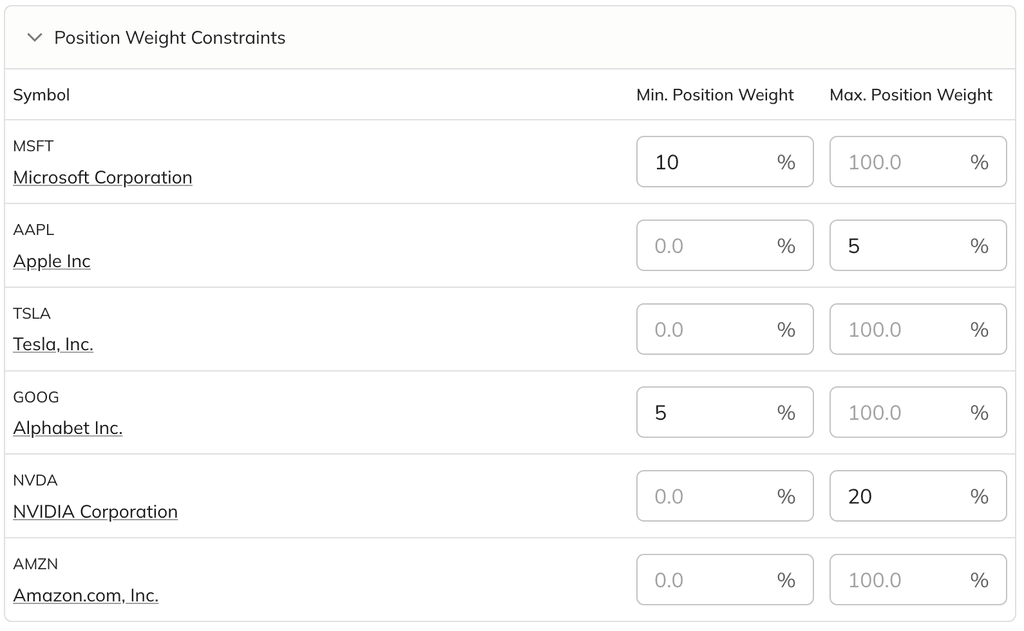
As always, your feedback is invaluable, so keep it coming!
3 comments
2 replies
Sort by
Oldest
S
SilverbackAugust 16, 24
Excellent feature!!
I got an Error Code 500. It seems conflicted when putting a minimum around 18 or 19. You also have to remember to change the max if the min is above it.
Also, could you include a decimal?
S
Silverback
last yr.
Thanks, seems to be working fine!
DS
Dmitry ShevchenkoAugust 20, 24
Thanks for your feedback. Yes, we still need to add some extra validation on top of the form to make the experience smoother. Regarding decimal constraints, we've released an update, so that should be working now.
NS
Norm SJuly 18, 25
Is there a way to save these constraints so I don't have to enter them each time?
DS
Dmitry Shevchenko
11mo ago
No, unfortunately, it’s not possible to save the constraints at the moment.